Enterprise Data Synchronization Overview
Features and Benefits - Frequently Asked Questions - Quick Start Guide
GeoWorx Sync provides bi-directional synchronization, giving users the flexibility to update data in GIS or ABB Ellipse and determine which system is best for associated editing requirements. With both databases storing common enterprise data, a synchronization mechanism must exist in order to ensure the currency and accuracy of the information in both of these systems. Sync provides bidirectional synchronization of ArcGIS feature fields and associated ABB Ellipse attributes and specifications that contain common data. Rules governing data flow direction can be configured at the attribute level, which allows users to define their required business rules for syncing data to either system.
Easily Configured & Business Rules-Based
Sync can be configured as a background process that would be invoked at a predefined interval to perform the synchronization without any user interaction. Synchronization methods are easily configured and managed based on specific business rules, which are defined via the GeoWorx Sync Dashboard.
Features in GIS such as locations, hydrants, pipes, valves, and services are associated to records in Ellipse by a common identifier Sync uses this relationship when synchronizing data between systems and maintains a configuration file that governs and saves the synchronization process.
During the configuration process, the config.xml file is populated with information that maps attributes in GIS to corresponding specifications in Ellipse and business rules for synchronization direction. Sync also allows the configuration of default values that are used to include a specific value to be put in a field to either system. Features such as value lists, calculated values, and related attributes can be configured to transform data as well.
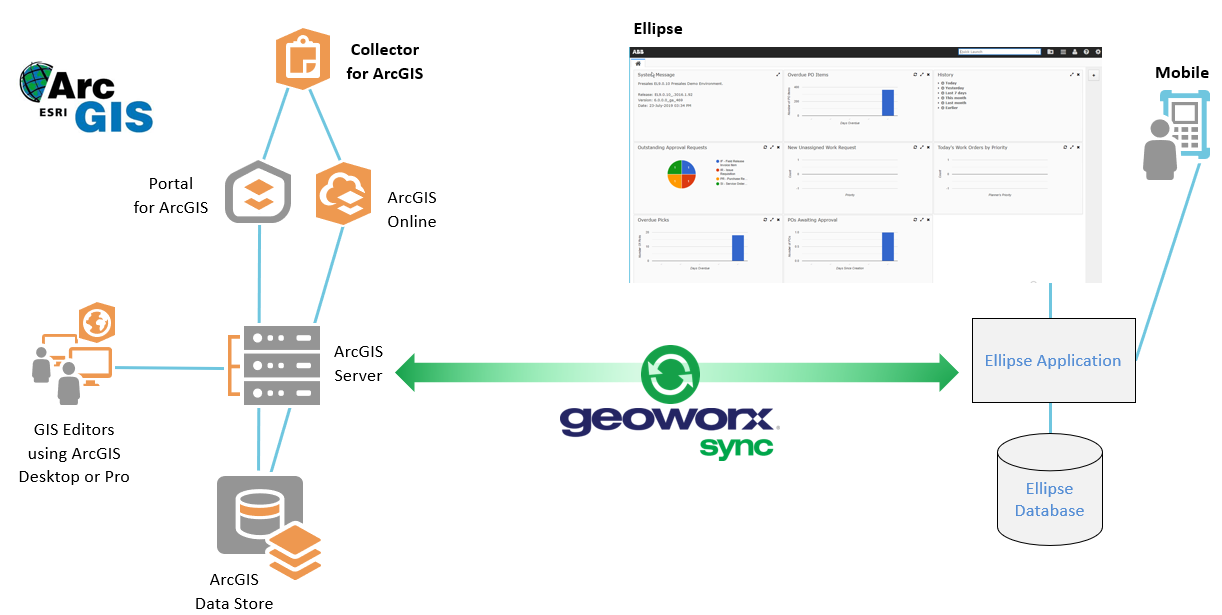
The below diagram is a high-level look at the Sync architecture that is governed mainly by the ArcGIS database, Ellipse, and Sync's core. Sync's core utilizes ArcObjects and services to connect to Ellipse. These together create a connection to Sync's core, which is the back-end of Sync's processes. When used with the GUI, Sync provides an interface to easily begin configuring rules for the synchronization of data. Sync can be utilized with or without the GUI, and both on-demand or as a scheduled task. Sync also does a full table compare each time it runs and queries records while storing changes in the datastore to better diagnose duplicates and incorrect data in future runs. Sync also abides by all business rules by managing records through the front-end of Ellipse.
Open topic with navigation